multiple login in yahoo widout any softwares

6/04/2009 05:47:00 AM Posted In Edit This 0 Comments »


multiple login in yahoo widout any softwares
You can login with multiple id's on the same yahoo messenger without any download or patch .
Follow these steps :


1. Go to Start ----> Run . Type regedit, then enter .

2.Navigate to HKEY_CURRENT_USER --------> Software --->yahoo ----->pager---->Test

3.On the right page , right-click and choose new Dword value .

4.Rename it as Plural.

Hidden emotions of yahoo messenger

5/28/2009 02:59:00 AM Posted In Edit This 0 Comments »
puppy dog eyes - New!:o3puppy dog eyes - New!
I don't know - New!:-??I don't know - New!
not listening%-(not listening
pig:@)pig
cow3:-Ocow
monkey:(|)monkey
chicken~:>chicken
rose@};-rose
good luck%%-good luck
flag**==flag
pumpkin(~~)pumpkin
coffee~O)coffee
idea*-:)idea
skull8-Xskull
bug=:)bug
alien>-)alien
frustrated:-Lfrustrated
praying[-O<praying
money eyes$-)money eyes
whistling:-"whistling
feeling beat upb-(feeling beat up
peace sign:)>-peace sign
shame on you[-Xshame on you
dancing\:D/dancing
bring it on>:/bring it on
hee hee;))hee hee
chatterbox:-@chatterbox
not worthy^:)^not worthy
oh go on:-joh go on
star(*)star
hiroo->hiro
billyo=>billy
aprilo-+april
yin yang(%)yin yang

Make DOT Yahoo ID on an Existing Yahoo Account

5/28/2009 02:21:00 AM Posted In Edit This 0 Comments »
1. Sign into your account where you want to add the alias

2. Click this link

CODE
http://edit.yahoo.com/config/login?.src=ym&.done=http%3A%2F%2Fedit.yahoo.com%2Fconfig%2Flist_alias%3F.src%3Dym%26.intl%3Dus

3. It will ask you to confirm your password.

4. You will come to a page that says Create an extra email address

5. In the Left type in the dot name you want to use.

6. It will create a new email account, IF that name is available.

7. Now when you go to your yahoo account information, you will see that dot name added to your alias.

This will only allow you to make ONE dot name per account. You will only be able to change this if you delete the old dot name and then make a new one

Old Yahoo Messenger Sounds

5/28/2009 02:18:00 AM Posted In Edit This 0 Comments »
They’re easy to get back. Here’s how:

Click this link.
http://us.i1.yimg.com/us.yimg.com/i/us/msg/8/old_sounds.zip

A dialog opens, asking you if you want to Open or Save this file. Click Save.

Another dialog opens asking you where you’d like to save it. To make it easy, just save the file to your desktop.

Double-click the .zip file on your desktop to “un-zip” it. A window opens listing all the classic Messenger sounds! Leave that window open.

OK: now find My Computer—it’s either on your desktop or in your Start menu in the lower left of your screen. Double-click it.

Navigate to C:\Program Files\Yahoo!\Messenger\Media. Here’s how:

Double-click “Local Disk (C:)”.

Double-click “Program Files”.

Double-click “Yahoo!”.

Double-click Messenger.

Double-click “Media”.

OK, enough double-clicking. Leave the “Media” window open, and move it beside your open .zip window.

In the .zip window, select all the sound files: click the first one, then hold down the shift key and click the last one in the list. Click, hold down and drag this list into the Media window.

A “Confirm File Replace” window opens, asking you if you want to replace the existing files. You do, so click Yes to All.

All right! Done. You can close these windows now… and move the .zip file to your Recycle Bin. The old sounds are back!

Tips To Be Safed From Yahoo Messenger Hacking

5/28/2009 02:15:00 AM Posted In Edit This 0 Comments »
Yahoo messenger has been one of the most popular and feature-ful online chat clients the world has seen. With plenty of options and buddies around, you can not just leave Yahoo Messenger once you have grown used to it. But where there is crowd, there are risk factors too. Alarmingly people have lost their accounts to hackers and have got millions of spyware and junk mails thanks to Yahoo messenger and its spam friendly technology. How do you get the best out of your chat buddy without risking your account? Well, here is a complete guide that will help.

1. Avoid P2P file Sharing Through Yahoo Messenger

Be it known or unknown, prefer not to receive any file from your friend unless you know what he is sharing and why. Avoid downloading .exe or .zip files from them as they are more likely to attack your computer or install trozans without you being aware of it. Never trust a stranger when he asks you to click on any site you haven't heard of.

2. Avoid Clicking on Spammy Links

If you were chatting with someone else and suddenly a PM box flashes on the screen with a lucrative offer/interesting site which has a spammy look, don't click on it. These websites have a lot of spyware who get silently installed if you go and surf them. Never download a toolbar unless its as authenticated as Yahoo's or Google's.

3. Use Ignore Option Effectively


Yahoo has an ignore option that lets you ban a person or mark as spam so that he can't disturb you once again. Use that option effective. Go to Yahoo Messenger main box -> Preferences -> Ignore List. If you want to avoid talking to strangers (which I always recommend)i.e. wanna talk to your buddies only, Check Ignore anyone.. option. That helps you be safe and block on the unwanted and potential hackers from reaching you. See the screen-shot below.

4. Use other yahoo 3rd party Chat Clients

Yahoo Messenger has too many loopholes. It doesn't have a strong security to block contents either. So, if you want to get rid of spams and porn contents all under one go, then you should go for some popular and secure yahoo chat clients like Yazak, y!supra. You can also go for Yah-Elite and Yam They may not have the same sophisticated GUI or entertainment features but they will increase the security of the chat sessions by many folds.


5. Always Use Newer Versions of Yahoo Messenger

Remember, the more you stay with the older versions and feel lazy to get upgraded, the more you are helping the hackers. Yahoo or any software, brings out these updates not only to extend features but also due to security reasons. A newer version of yahoo messenger 9 is hardly bootable by DoS attack whereas Yahoo Messenger 7 can be booted out or hacked by a script kiddie.

6. Don't download Yahoo Plug-ins from Unauthorized source

Do not ever download a plug-in of Yahoo messenger from any other site however lucrative it be. Plug-ins like these exploit the vulnerability once installed and send your account details to a third party revealing and cracking down your id. So, better be safe than sorry. No?

7. Use Proxy if you have a Better Firewall

Yahoo also gives you option to change your proxy. Go to Preferences and hunt down Proxy servers. You will see that you can set your own proxy server so that Yahoo gets redirected through yours giving you a better chance to protect yourself and secure by your network. But if only you have that faith on your network security. You can change it by going to Yahoo Messenger main box -> Preferences -> Connection


8. Use Word Filter

You can also use your word Filter in Yahoo messenger. It just discards all the obscene or threatening words by intelligent filtering system if you choose Strong option. But be aware, there may be some times when your own friend can get banned while cursing your jokingly. Word filter is another good option to be within your network and not let some specifically targeted spammers to arrive. It increases security too. You can change it by going to Yahoo Messenger main box -> Preferences -> Chat.


9. Be sure to Delete Your Profile after Chatting from a Public computer

Most of the users don't know about it. Whenever you sign in to yahoo messenger, yahoo makes a profile of yours in the directory Yahoo -> Messenger -> Profiles by the name of your yahoo id. There is an option by default at Yahoo messenger that messages will be saved as long as you are signed in to your account for that session. A good hacker can have access to that file and decrypt it to learn your private conversations.

What you must do if you are sharing a public computer to chat from, is, you can change it by going to Yahoo Messenger main box -> Preferences -> Archive. Change it to No, do not save any of my messages and you are done. Oh don't forget to delete your profile from Profiles inside Yahoo folder after you sign out.

10. Apply Your Common sense and Use a good Antivirus and anti spyware software


Applying your common sense is the least you can do to prevent your account from being hacked. A good anti-virus and anti-spyware always warns you about dangers that you may have overlooked. So its better to have them as well. If you implement the above 9 tips, you won't need to worry much I gues until you personally hand over your information to the person willing to crack your computer down

Trick To Remove Yahoo Messenger Advertisement

5/28/2009 02:14:00 AM Posted In Edit This 0 Comments »
trick is working great on yahoo messenger 9 version. I have tried this method and there is no yahoo ad on my messenger. It is a simple trick , the yahoo messenger pick the ad from this url insider.msg.yahoo.com . So, if you try the below trick the local host will block this url and no yahoo ad will appear on yahoo messenger interface. Its working good in yahoo messenger 9 version, havent tried on lower yahoo messenger versions.

Steps For Removing These Kind Of Ads From Yahoo! Messenger :-

* Close Yahoo! Messenger
* Go To " C:\WINDOWS\system32\drivers\etc "
* Open The File Named "hosts" In Notepad Or Any Other Editors
* After The Line
127.0.0.1 localhost
Add
127.0.0.1 insider.msg.yahoo.com
* Restart Windows.

Remove Your Yahoo Id From Victim's addlist

5/28/2009 02:13:00 AM Posted In Edit This 0 Comments »
If some one is annoying you on yahoo messenger and keep on irritating you by sending spam related messages, its now time to remove that lamer out from your and as well as his/her addlist. There are many yahoo exploits software's out which can remove your yahoo id from victim addlist. You can google it and find by the name of buddy deny or remove yahoo buddy.

I will post soon some good list of yahoo buddy remove tools only if i got request from you guys.

Mean while while surfing on internet i found a good website which provides the similar feature of removing of your yahoo id from victim yahoo messenger add list. So it saves your time and also no need of downloading the yahoo buddy removed exploits to your PC.

Below is the link of website, just click it and enjoy.
http://www.vizgin.com/remover.php

Add someone to your Yahoo Messenger list without their permission

5/28/2009 02:11:00 AM Posted In Edit This 0 Comments »

How to Add someone to your list without their permission

Ok, for those who have been on yahoo as long as I have, this is the way
we use to Add someone to our friends list without them knowing.

1) Pick an account that you want to Add the person to.

2) Create an alias account under that main ID;

3) Sign into messenger with the Alias you just made.

4) Go back into the account information, and click the delete button to delete the Alias ID HOWEVER DO NOT CONFIRM IT YET.

5) Add the user to your friends list in messenger under that new alias account.

6) After to have added the user, IMMEDIATELY go and hit the confirm button to delete the alias profile.

7) Now the user you just added, will probably deny the request to add
them, however you never get that denial because you have deleted the
account to which the ADD came from.

The user will remain on your friends list for the main account name

How To Find Yahoo Messenger IP Address

5/28/2009 02:09:00 AM Posted In Edit This 0 Comments »

This trick is only for fun , please dont use as wrong means. Its only for educational purpose so just enhance your education and be safe from the yahoo hackers and virus.

Tracing Yahoo Messenger is all about using some tricks to track and find out anyone’s IP address. We all chat with our friends or relatives using Yahoo messenger. This is very familiar with us. To respect everyone’s privacy, Yahoo messenger does not show us the IP address of those people we are talking with. But this is possible to apply some simple tricks to bypass yahoo’s security settings and hack anyone’s IP addresses.

trace yahoo messenger ip address


Lets discuss how.

Whenever we chat with someone, the whole process is controlled by Yahoo server. There is no way to hack Yahoo server, this is almost impossible. As we don’t communicate with the person directly using our own system or network, this is impossible to hack this encrypted IP source. So, we have to set up a direct connection with the person in order to track his IP address using Yahoo messenger. Simply send the person a big file (Not less than 3 MB) via Yahoo Messenger File Transfer. Once he accepts the file, his computer makes a direct connection with your computer for the file sharing process. And here we go.

Once both the IPs (Your’s & the Victim’s) get engaged in the file sharing process, it will take you a maximum of 2 minutes to track his IP address. Now it’s time to hack his IP address by following below steps. Remember, do not start file sharing from the beginning.

Read the instructions carefully.

1. Go to Start –> Run (This will open your windows command prompt)
2. Type CMD and hit Enter
3. You will get a list of IP addresses like the below screen shot.
4. You can notice two columns as Local Address and Foreign Address there. Local address is your address while foreign address is the IP of the recipient with whom you are sharing the file.
5. Send him the 3 MB file (You can send him a small clip, zipped images etc)
6. Now type netstat -n in the command prompt
7. You will get a output. Suppose the following is the output.

TCP 129.11.25.10:5181 174.35.20.66:1646 ESTABLISHED
8. In the above one 174.35.20.66 is the IP address of that person and 1646 is the port no where the file transfer is taking place. You are done here.

change yahoo messenger title bar

5/28/2009 02:03:00 AM Posted In Edit This 0 Comments »
go to C:\Program Files\Yahoo!\Messenger

open the file named ymsgr.ini


add the following text at the end

[APP TITLE]
Caption=giv ur desired caption


save and close the file.........open yahoo messenger ..now u can see ur desired caption

Trick to know if your friend is invisible on Yahoo Messenger

5/28/2009 02:00:00 AM Posted In Edit This 0 Comments »
There r many ways to know ....

method-1 :- go to below site
Use these Sites to Check who is invisible in yahoo:

www.detectinvisible.com
www.imvisible.info
www.invisible.ir
www.invisible-scanner.com
www.scanyahoo.com
www.xeeber.com
www.ydetector.com


or

mthod-2):-

This is a very simple trick to know if your friend or a certain user is on invisible mode without using any Yahoo spy program. Some reasons why they chose to appear offline are they maybe too busy to talk to anyone, having a conversation to someone important, or just trying to ignore you .

Follow this simple trick to find who among your friends are hiding
The first step is open a chat window on the person you want to check by double clicking it’s name.
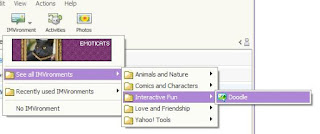
yahoo messenger invisible
Click on IMVironment, Select “See all IMVironments”, Select “Interactive Fun” then click on Doodle

Send your friend a short message so your friends chat window will load. If you don’t do this the Doodle will not load even if your hiding friend is online.
If your friend is offline the Doodle IMVironment will not load and will just show this “waiting for your friend to load Doodle” continuously.
If your friend is Hiding then the Doodle will immediately load you should get a blank page like in the picture below. Then it is confirmed your friend is really avoiding you

find yahoo invisible
After doing this… most of the time your hiding friend will immediately close the chat window and you will see a exact message like you see on the picture below.

invisible on yahoo messenger

YAHOO - opening multimessenger without software

5/28/2009 01:53:00 AM Posted In Edit This 0 Comments »
follow the given below steps : : :---

Click Start button and type regedit in Run option then press Enter for next.

multi yahoo messenger


Here locate the location :

HKEY_CURRENT_USER/Software/Yahoo/Pager/Test


multi yahoo messenger


Here in right side panel, right click to create a new Dword value with name Plural and give it value 1.

multi yahoo messenger


Now close the registry editor and restart your computer after any changes to go into effect. For signing in with new YAHOO ID open another messenger open as many messengers you need. If you want to disable the multiple messenger option then again open registry editor and change Plural value 1 to 0.


multi yahoo messenger